Blog Post #1 Establishing a Professional Blog
From Rows of Desktops to a Lab Students Will Use
A $60,000 plan for accessible technology and flexible learning
The initial thing I had when I was designing my ultimate computer lab was a basic concern. Devices in a room don’t always facilitate learning. A lot of students require steady equipment and a quiet environment to concentrate. Others need space to work with classmates. I propose to spend $60,000 to create a shared lab for guided lessons and independent work.
A classroom designed for student learning
According to Bell (2022), academic computing environments are transitioning to service-based computing models influenced by student use. I used this concept in my lessons by using a fixed desk and a mobile Chromebook cart. Twenty desktop stations provide software-intensive assignments. Fifteen Chromebooks provide access beyond one row of Chromebooks.
The floor plan also eliminates the rigid desk layout and introduces four workstation pods and an open center. The teaching area is anchored by an interactive display. Students then transition to partner work with minimal furniture moving after a brief demonstration. The instructor still has a good view of each zone.
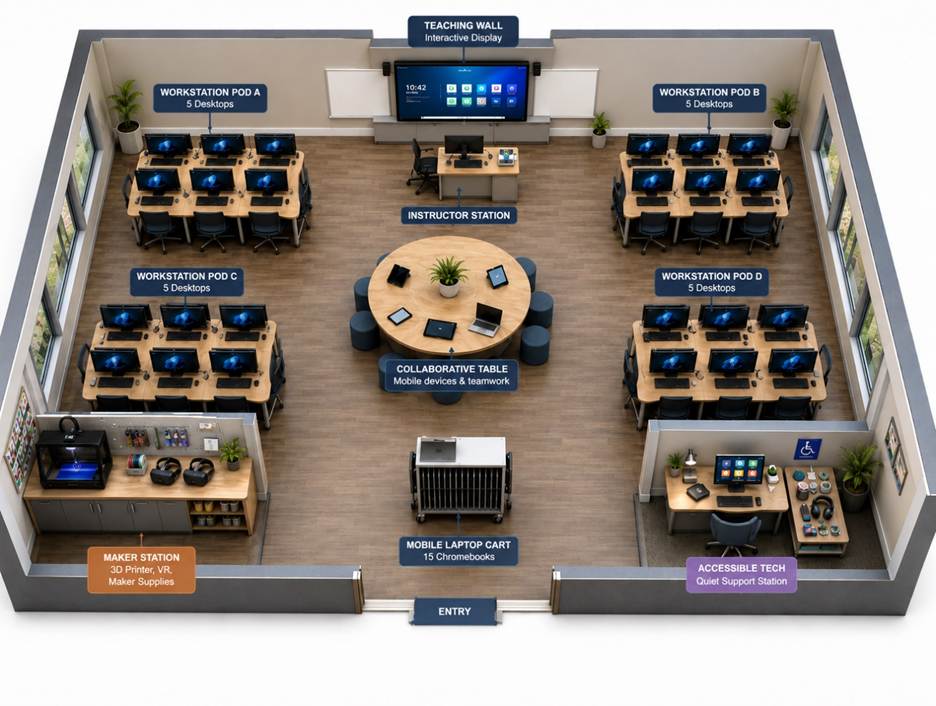
Figure 1. Redrawn floor plan based on the Module 1 proposal.
Access should begin with the floor plan
Universal Design for Learning (UDL) is described in more than one way to engage with content and demonstrate learning by CAST (n.d.). The idea is put on the inside of the room. Wheelchair routes are protected by wide aisles. Students have an increased ability to position themselves when using height-adjustable desks. A low-distraction station provides an alternative workspace when the main space is crowded.
The software selection is also influenced by accessibility. Blind students are supported through the use of screen readers. Microphones with captioning are used for students who are deaf or hard of hearing. These are kept in one visible station, rather than put away and retrieved when a barrier is raised.
The lab is also available for students with their own devices. The room is equipped with furniture and stable wireless connections, making it a convenient study area between classes. Pupils who do not have reliable computers at home have access to more powerful computers.
Spending with a definite goal in mind.
The budget allocates the most funds for equipment that is used on a daily basis. The Chromebook cart will be $6,500, and the desktop workstations will be $14,000. Adjustable desks receive $7,000. Each zone is required to have a stable wireless connection, and network upgrades cost $5,000.
The idea caps the combined price of the 3D printer and VR set at $7,000. This balance not only helps to maintain the lab practical but also allows instructors to experiment with different lesson formats. The rest of the cost is for furniture and instructional equipment. There’s another share for access supports and software. The plan is completed with installation.
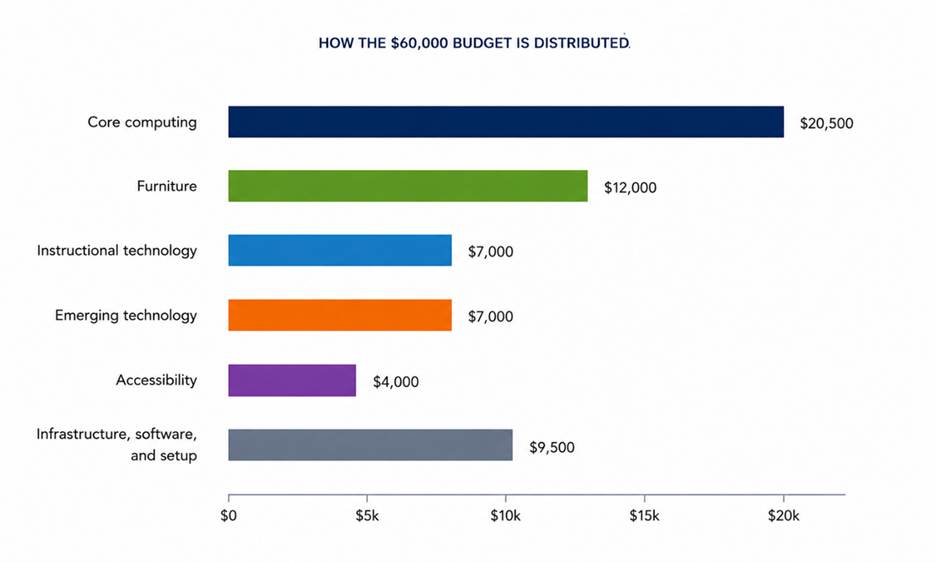
Figure 2. Grouped distribution of the $60,000 budget from the Module 1 proposal.
What success would look like
Instructors would transition from modeling to partner work in the lesson without re-grouping the entire class. At open hours, students would complete their assignments or get help from a lab aide. Both uses could be accommodated in one space.
At the end of the first semester, I would check room use logs and brief feedback questionnaires. The findings would indicate the most popular zones and the training needs of staff. It is important to make future purchases based on this evidence and not on personal preference.
This proposal is important because access goes beyond having a device. Students must also have reliable space and support. A flexible lab offers both. Each dollar is dedicated to a specific student need, and each zone serves a purpose.
References
Bell, S. (2022). Moving to mobile: Space as a service in the academic library. EDUCAUSE Review. https://er.educause.edu/articles/2022/4/moving-to-mobile-space-as-a-service-in-the-academic-library
CAST. (n.d.). Artificial intelligence and Universal Design for Learning. https://www.cast.org/what-we-do/artificial-intelligence/


Leave a Reply