Blog Post #3 Testing Productivity Tools
Testing Trello and Todoist for a weekly instructional technology plan
A practical test of paper planning, Trello, and Todoist using the same five-day workload.
Test snapshot
| Method | Estimated time | Approx. trial time | Output quality | Learning effort |
| Handwritten plan | 8 min | 6 to 7 min | 3/5 | None |
| Trello | 7 min | 5 to 6 min | 5/5 | Moderate |
| Todoist | 5 min | 3 to 4 min | 4.5/5 | Low |
Why I tested these tools
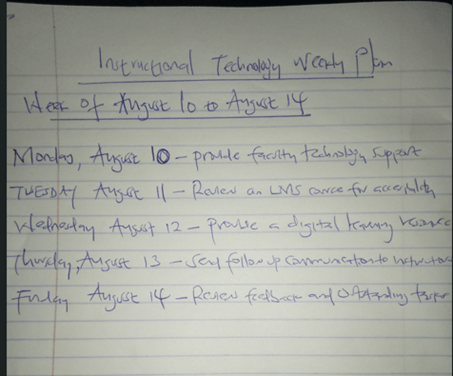
A weekly instructional technology schedule looks simple until several responsibilities compete for attention. I did the same 5-day work week 3 times for this test. The schedule included faculty technology support on Monday, LMS accessibility review on Tuesday, digital learning resource on Wednesday, instructor follow-up on Thursday, and review of unfinished work on Friday. I wanted to find out which method was the easiest to organize and scan the week.
I did a comparison of a handwritten plan and Trello and Todoist. Each method was judged by the quality of the output and the approximate time it took to complete. I also thought about how much effort I put into learning, and if the final view was easy to find deadlines. Alqurni (2023) reported that interface and navigation have an impact on the satisfaction of educational software. This was important here because it requires little time to use a productivity tool if basic task entry is not intuitive.
What happened during the test
This handwritten plan required 6-7 minutes. The page was quick to start and didn’t need any setup. The weakness was only noticed when the schedule had to be edited. A paper list was clear for the week, but it was difficult to move or track progress with it.
It took approximately 5-6 minutes for Trello to be created after the board was created. I added all five tasks to the To Do list with dates from August 10 to 14. There were also Doing and Done columns on the board. That was a structure that allowed progress to be seen at the flick of a switch. Trello was more involved than Todoist, but the board view provided the best visualization of workflow. That is backed up by research. A study by Fontalvo et al. (2025) found that students who used Trello were able to submit their work 3.5 days before the deadline, while those who used traditional methods were able to submit their work 1.5 days before the deadline. They also had a higher final assessment score for their Trello group.
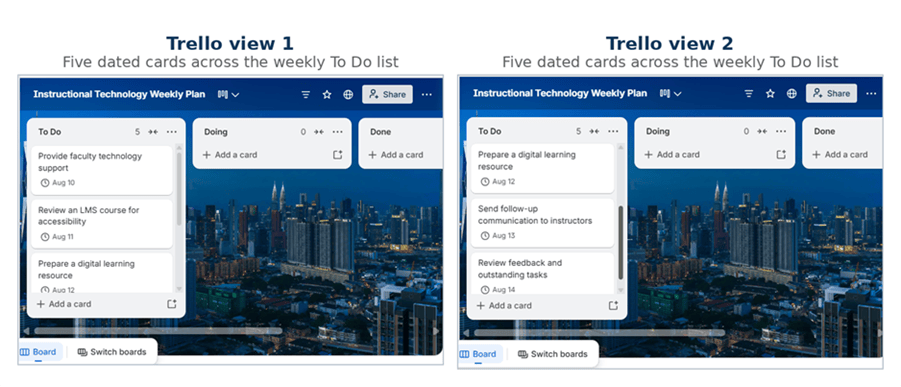
Trello trial. Two views were needed to show all five dated cards in the To Do list.
It took me around 3-4 minutes. The same five tasks were present in one project and had the dates Monday to Friday. The interface remained on the task list, making entering and reviewing the schedule faster. The last page was not as visual as Trello, but the dates were more readable. That simplicity was more important to an individual teacher with a typical week of classes than having multiple workflow columns.
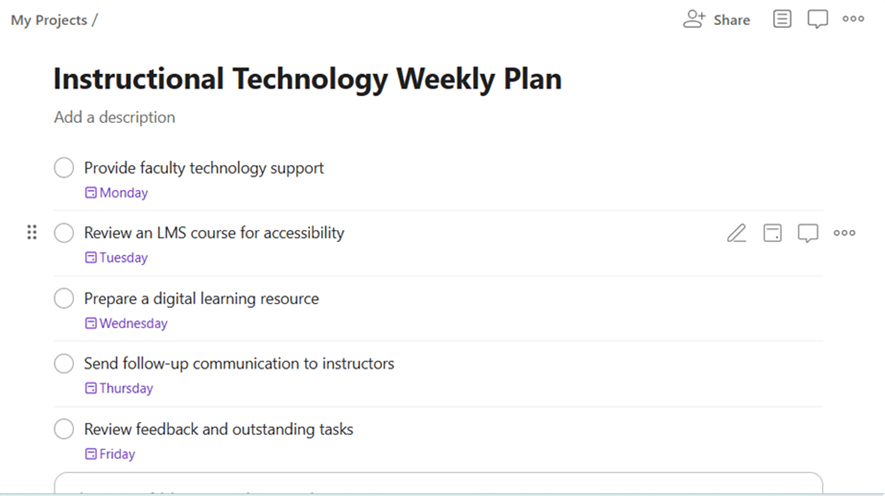
Todoist trial. All five tasks and weekday dates appear in one project view.
Which tool worked best
Trello got the best mark for visual organisation. The board format is appropriate for projects that go through phases or for multiple people to see the same view. Todoist was more effective in terms of speed and learning. The more streamlined design minimized setup time and ensured that all deadlines were easily seen.
Features are not as important as usability. Alqurni (2023) found a significant relationship between satisfaction with navigation and satisfaction with progress tracking, and Fontalvo et al. (2025) demonstrated a significant relationship between structured digital task management and academic performance. My little test arrived at a comparable functional conclusion. A helpful productivity tool should minimize planning time without compromising clarity of work.
Todoist would be my app for my weekly instructional technology plan. For team projects and work that has multiple stages, Trello is still the better option. Todoist is a good fit for this one-off task because the schedule was added quickly and without needing to move around the screen much. That all depends on the task, but for a five-day personal plan, Todoist provided me with the most streamlined experience when it comes to speed and clarity.
References
Alqurni, J. (2023). Assessing the usability of e-learning software among university students: A study on student satisfaction and performance. International Journal of Information Technology and Web Engineering, 18(1), 1-26. https://doi.org/10.4018/IJITWE.329198
Fontalvo, H. R., Rico, F., de la Puente, M., Londoño, T., & Navarro, D. (2025). Digital task management platform enhances student academic achievement in economic development education. Discover Education, 4, 584. https://doi.org/10.1007/s44217-025-00993-7


Leave a Reply